|
September 2nd, 2010

Many people says they need to send million emails out for email marketing events. Even the response rate is low, they still can get substantial amount of response. As the flood of junk mail, internet service provider and also end user install different spam filter to get rid from the junk. This also reduce the response rate of the marketing email. Actually, if you’ve a effective email list, you still can get a high response rate.
Permission Email
The most effective email list is generated from the end user. User subscribe to the email and agree to receive your email newsletter. You can create a subscription box. People can submit their email address to subscribe your newsletter. To ensure the user is the owner of the email address, you should use double confirmation process. When user submit his/her email address, you should send an email with a confirmation link immediately. User need to click on the link to confirm and complete their subscription.
As the email address are provided by the user, people are willing to open and read your email address. The response rate is much higher with this permission email. Also, you will not receive complaint about sending spam email.
Subscription
To encourage the user to subscribe your email newsletter, you need to
- provide useful and relavent information
- state clearly when and how frequent is your newsletter, daily, weekly or monthly. Will you send out email under other sceanrio?
- opt out form to allow user to un-subscribe from your newsletter
- let user know will you send email for other business parties
- tell user your privacy policy and how you handle their personal information.
Filed under: Email Marketing | Comment (0)
August 26th, 2010

Information in an Invoice
The following list shows the basic information should be shown in an invoice.
- Your Company name
- Company address
- Telephone number
- Email address.
- VAT registration number (if VAT is applied)
- Invoice number
The invoice should have a unique invoice number. You may also include a prefix in the invoice number. It can be used to indicate the customer or document types.
- Invoice Date
- Client Details
Include the customer name and address. You may also put the phone number for reference.
- Payment Term
States how you would like to receive the payment. You may need to state the payment due date also.
- Shipping Term
States how the items will be shipped to the customer
- Fees
- Amount of the line item
- Subtotal
- Tax/VAT (if applicable)
- Total Amount
- Notes
You may put some additional information into the Notes field.
Format of Invoice
If your customer accepts an electronic format of invoice, you should prepare your invoice in PDF format.
PDF format is good for electronic delivery as:
(1) PDF cannot be altered,
(2) it can be opened freely in different platforms,
(3) the layout of the invoice can be kept and printed correctly in different platforms.
Filed under: Office / Productivity | Comment (0)
August 19th, 2010

What is the advantage of using PDF format file?
1. Platform Independent
PDF is a portable document format, which is work on Windows, Macintosh and Unix. It is a document which is independent of the hardware, operating system and application software used to create the document. It can be shared across different platforms. A PDF document created in Windows can be read in another platform such as Macintosh or Unix. The cross platform feature makes PDF a choice to use over Internet.
2. PDF viewer is freeware
PDF file can be viewed and printed with a freeware. PDF reader can be download free from Internet on computer or mobile devices. In other words, the PDF document can be read freely by everyone.
3. Password Protect
PDF file allows you to protect your document with a password. You can password protect the PDF file from printing, editing, and copying.
4. Cannot be easily altered
JPEG, GIF or TIFF File Format can be easily altered. However, PDF file cannot be easily altered without leaving an electronic mark. If you share your photos with others, your photos can be easily be altered. But if your photos are in PDF format, your photos cannot be altered easily. It is also convenient to flip to and fro to review your photos.
Filed under: Office / Productivity | Comment (0)
August 12th, 2010

Keywords play an important role in search engine optimization. It affects search engine ranking of your website. You need to put keywords into different places of your webpage, like Title, Description, First Paragraph. But which one are the most important and have higher impact on the search engine ranking.
Here’s the list shows the importance of the places to add your keywords.
1. Title Tag
2. First Word of Title Tag
3. Domain Name
4. H1 Tag
5. Anchor Text of Internal link
6. Anchor Text of External link
7. First Word of H1 Tag
8. First Paragraph
9. Sub-domain name
10. Web page name
Filed under: SEO | Comment (1)
August 5th, 2010

An email marketing campaign is one of the cheapest ways that can be used to promote product to customers. Even it is cheap, you still need to take every steps to achieve a higher success rate. To perform a success email marketing campaign, you need to have:
- comprehensive recipients list
- good email software
- attractive and well designed email contents
- but when?
Let investigate what times you should not send the email?
- Mid-night
People always think that spam message are sent at night. When they back to office in morning, they just check their emails and delete those marketing email. People don’t expect their normal business email is sent at mid-night.
Is it okay to send during office hour? No. You should not bother your receipient during their office hour. The best time to send your email is close to the end of office hour. The recipients are more free to do some off track work or browse the internet.
- Holiday
During the holidays, people tend to be away from computers. They will not check their email frequently and regularly. When they back to office, they will get tons of email to handle. Those marketing/spam message will be deleted without a look. You should aovid sending emails during summer holiday, christmas or new year.
- Weekend
Weekend is similar as holiday. The inbox is much full on Monday compared to the rest of the week. The first easy task to process email is to delete those marketing or spam message.
Filed under: Email Marketing | Comment (0)
July 29th, 2010

- Perform search engine optimization
Make your website search engine friendly. Search engine optimization is the key to getting good search engine ranking.
- Avoid a solely-flash web sites
Search engines don’t know what a flash is about and they don’t index flash content.
If your website are built only with flash, you may even have trouble to get indexed by search engine.
- Avoid Javascript navigation menu
If this is the case, you should provide an alternative. Navigation menu is a good path for search engine to further crawl your website.
However, search engine will not crawl Javascript. It is better to avoid javascript navigation menu.
- Build inbound links to your site
Building inbound links from other websites can improve your website’s credibility.
It can also helps people find your site.
- Include relevant keywords
Put relevant keywords in your title, description and page content. If your website is lack of relavant keywords and phrases, how can people find your website? Do make a comprehensive research and put relavant keywords to your website.
- Avoid black hat trick, like keywords spam.
Search engine will give penalty to those website with seo trick.
Filed under: SEO | Comment (0)
July 22nd, 2010

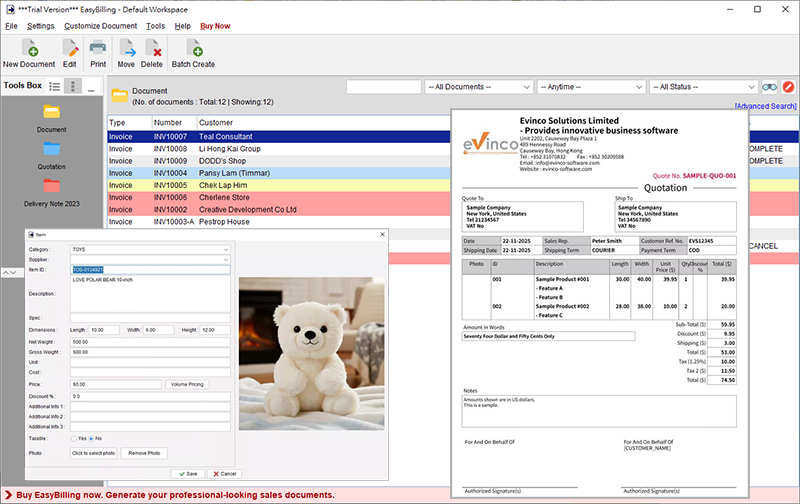
Invoices or Bills are generated by the seller and passed to the customer along with the product. According to the invoice, the customer pays the bill to the seller.
Many small business owners use hand written invoice. They fill out the product entries and price information with hand and send the hand written invoice to customer. Another option is excel template.
They can open the excel template, type in the invoice details in the pre-defined cells and print the copy to the customer. Hand written Invoice or Excel Template is an easy and cheap method, but it also brings many disadvantages. The documents are not organized and keep in a single source, which is difficult to recall the document, perform query, and generate statistical data and report.
Benefits of Using Invoicing Software
1. Improve Accuracy of Invoice
The chance of forgetting some important things when preparing invoice with hand is high. Invoicing software has many feature to help you filling the invoice, likes auto-fill date, auto-fit layout, etc. It may also alert you for important fields or errors. You can put more attention on the invoice contents, which can greatly increase the accuracy.
2. Improve Efficiency
In the invoicing software, you can save your product and customer information for later recall. By clicking few buttons, you can fill up the product and customer information easily. You don’t need to type those information again and again.
Some software also allows you to generate other documents, like Quotation, Receipt, Delivery Note, Purchase Order. This is important as it can greatly improve your company internal process and reduce tons of paper works.
3. Project a Professional Image
You may create a properly formatted copy of your Invoice in PDF format anytime. This is especially useful if you want to print or email the document. A well-designed invoice with nice layout can show the details of price and product to the customer clearly. This can greatly increase the customer’s confidence and also increases his assurance level to come back again.
4. Make Tax Preparation/Audit Easier
If using hand written or Excel template invoice, you need to perform accounting process manually. It is time consuming and you may forget the details about a specific invoice/transaction. With the software, all your invoice and billing information are already in the system. It can be easily retrieved and recalled. Your accountant feels happy if you have all the invoice or bill information in one place.
Software can also generate different types of report which can helps for preparation of financial statements of the business and avoids inaccuracy in the financial statements. Tax preparation goes much more smoothly.
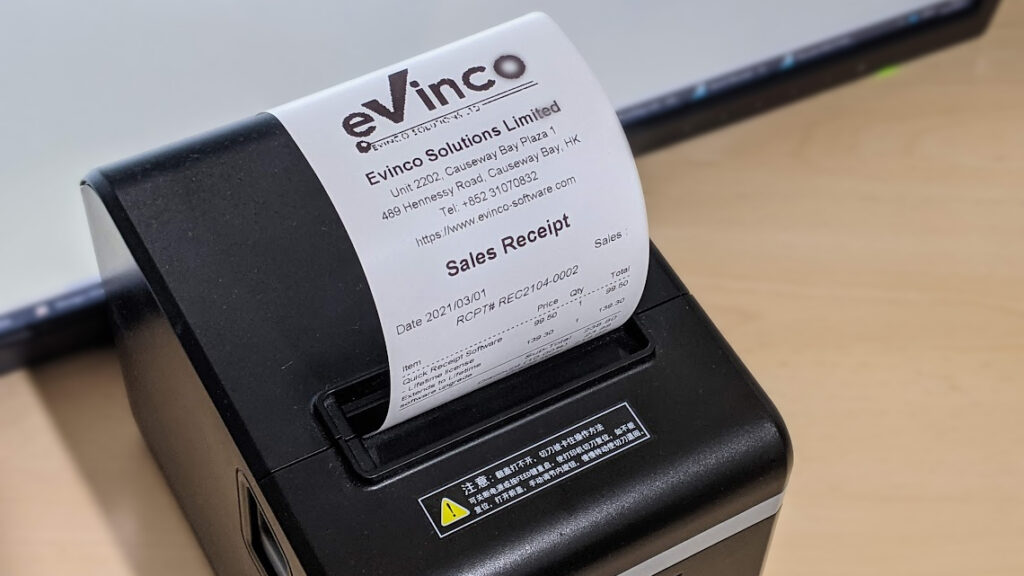
EasyBilling software helps you prepare Quotation, Proforma Invoice, Invoice, Receipt, Purchase Order, Delivery Note, Packing Slip, Ordering, Credit Note & Debit Note. Visit EasyBilling Invoicing software for the details.
Filed under: Office / Productivity | Comment (0)
July 17th, 2010
Filed under: Royalty Free Photos | Comment (0)
July 15th, 2010

By optimizing your website, you can improve the page loading speed. At the same time, you can use less bandwidth and reduce the cost. More important is that visitors has a better experience when surfing around your website. They are willing to spend more time on it.
Following are the four area you can improve your website
1. Enable page compression using GZIP.
Using gzip compression, your web server will compress the pages before deliver to the visitors.
The browser receive the compressed page and decompress it. The compression can greatly reduce the page size and use less bandwidth.
You may consult your web hosting company on how to enable the page compression.
2. Minify CSS and Javascript files.
By removing whitespace and comments, you can reduce the file size a lot.
You may also check to remove those unused function.
3. Combine all Javascript files into a single file.
If you have several javascript files, you should put them together into a single file. If you’ve three javascript files, browser need to make three requests to get these three files. By combining the files, it can reduce the download overhead.
You should do the same for CSS files.
4. Image optimization.
With image optimization, you can greatly reduce the size of your image and keep the image quality without any visual difference.
Filed under: SEO | Comment (0)
July 8th, 2010

When preparing a cheque, a lot of people forget to fill out something on a cheque. It is troublesome if the cheque cannot be drawn and bounced.
Check list for writing a cheque.
- Write the date on the cheque.
- Fill in the name of the payee legibly and correctly. Write as close to “Pay” (the left) as possible.
- Is it a bearer or cross cheque? Makes two diagonal lines on the top left corner for cross cheque.
- Write the amount in words and keep the writing closely padded. Ensure you have the word “Only” at the end.
- Fill in amount in figures.
- Remember to sign the cheque. May be you need to have your company chop also.
- Fill out the stub for record keeping. You can remember what the cheque is for.
Here are some tips:
1. If you made a mistake, you should clearly cross it out and give your full signature next to the change.
2. Write the cheque in ink permanently and ensure changes cannot be made afterwards.
3. Ensure the amount in words matches the amount in figures.
4. Verify your cheques again before presenting it.
Actually, there is software which can help in preparing and printing cheque.
ChequeSystem software can help avoiding any handwriting mistake. It can also keeps the cheque records automatically for future reference.
Cheque Printing software has many useful feature helps you writing a cheque.
1. Auto set the current date for the cheque. You can adjust it if need.
2. Payee name can be loaded from a pre-defined list.
3. Just type in the amount in number. The amount in words will be generated automatically.
4. Have checkbox to mark the cheque is crossed, bearer, etc.
5. The printing fits well and closely to avoid too much empty space left.
6. The software can also alert you if overdraw occurs.
7. The cheque records will be saved automatically.
8. Reports can give you a list of issued cheque with every details, include Date, Payee, Amount, and total lump sum.
9. Software can also save the recurring cheque template for later recall. If you need to write cheque for someone regularly, recurring cheque template is useful and you can recall it without typing everything again.
You may visit ChequeSystem Cheque Printing software and see how easy and simple to prepare a cheque.
Filed under: Office / Productivity | Comment (0)
|