Evinco Software: Streamline your business
English ▾
English
繁體中文
简体中文
☰
Home
About Evinco
Software
ChequeSystem
Cheque Printing Software
EasyBilling
Invoicing Software
Quick Receipt
: Thermal Printer Software
Robo
Mail
Mass Mail Software
Small Biz Software Bundle: EasyBilling+RoboMail
Privacy Scrubber
Software
Photo
PDF
Photo to PDF Converter
Photo
X
Batch Watermark Software
Smart
Calendar Software
News
Knowledge Sharing
Support & Contact
Smart Calendar Links
⋮
Home
Buy Now
FAQ
How-to
User Guide
Release History
Smart
Calendar Software
v6.1.0 • Available for Windows & Mac
Download Free Trial
Fully Functional. Access all features.
Smart Calendar User Guide
[Download PDF Version]
Edit Calendar
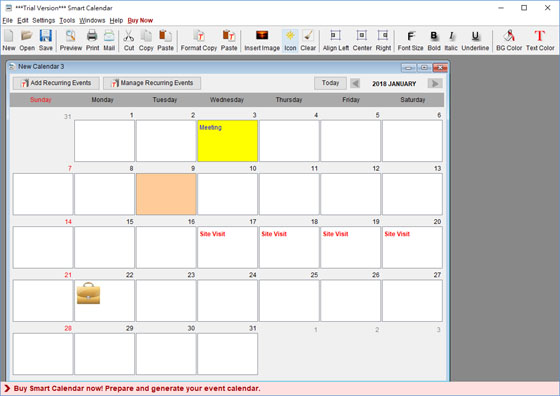
To insert your events into calendar, simply click into the corresponding box and type in your events.
Click
and
button and switch to another months.
Click
button to add recurring events.
You can adjust the text alignment, background color and text color for the Day Box.
Click the text alignment icon,
,
, and
to align the text to left, center and right respectively.
Click the
,
,
, and
icon to alter the font style.
Click the Background Color Icon
to fill the background color of the Day Box.
Click the Text Color Icon
to change the text color of the Day Box.
Introduction
License
Installation
Using Smart Calendar
Main Screen
Create New Calenader
Types of Calenader
Edit Calenader
Export Calenader
Settings
Calenader Settings
Holiday
Header
Footer
Font
PDF Properties
Paper Size
Tools
Print Blank Calendar
Set Password
Backup
Restore
Registration
Register
 Evinco Software: Streamline your business
 and
and  button and switch to another months.
 button to add recurring events.
 ,
,  , and
, and  to align the text to left, center and right respectively.
 ,
,  ,
,  , and
, and  icon to alter the font style.
 to fill the background color of the Day Box.
 to change the text color of the Day Box.