
When businesses think about cheque management, the focus is usually on the physical act of printing. However, treating cheques merely as pieces of paper is a missed opportunity. In modern business operations, every issued cheque is a data point that, if tracked properly, can provide vital insights into your cash flow and daily workflow.
Rather than just using basic printing utilities, businesses should adopt a “dashboard-driven” approach to cheque management. By visualizing your cheque data, you transition from reactive administrative work to proactive financial control.
Here is how setting up a centralized dashboard for your cheque activity can streamline your operations:
1. Visual Task Triage: Knowing What to Do Now
A good dashboard should act as your daily financial to-do list. In a busy office, it is easy to generate a cheque in the system but forget to actually print and mail it.
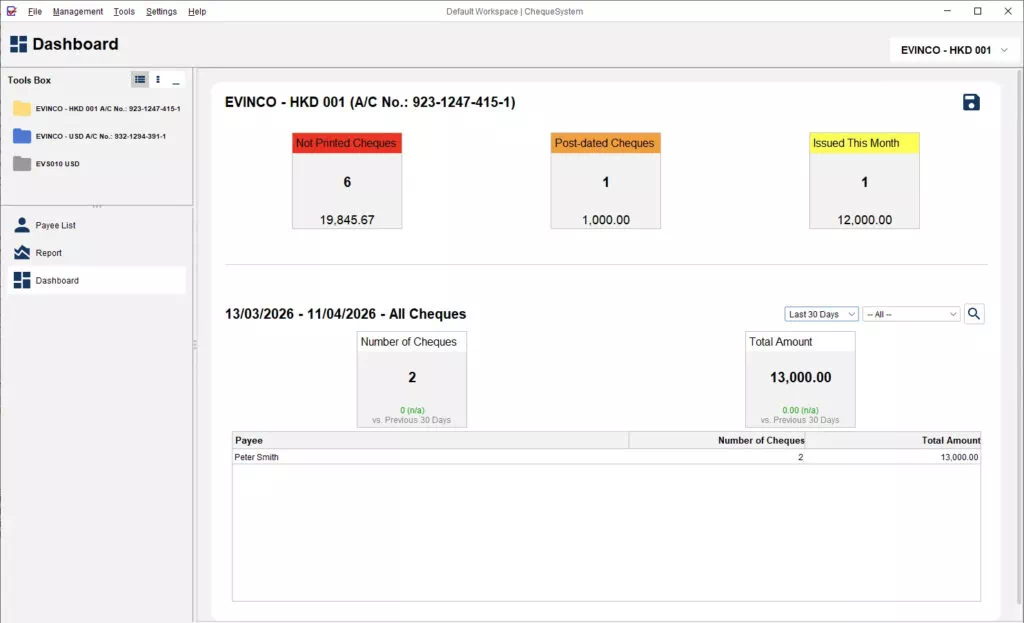
Using visual, color-coded cues can eliminate this bottleneck. For example, in the ChequeSystem software dashboard, a prominent Red Information Tile instantly flags “Not Printed Cheques.” This immediately tells the user exactly how many cheques are awaiting physical printing, turning a potential oversight into a clear, immediate action item.
2. Cash Flow Foresight: Preventing Bounced Cheques
One of the biggest risks of manual cheque management is losing track of post-dated cheques. If a vendor cashes a post-dated cheque and your account lacks the funds, you face bounced cheque fees and damaged vendor relationships.
To prevent this, businesses need a financial radar. A proper system should alert you to upcoming liabilities. ChequeSystem addresses this with an Orange Tile dedicated to “Post-Dated Cheques (Next 7 Days).” By seeing the exact number and aggregate value of cheques maturing in the coming week, business owners get the necessary lead time to ensure adequate deposits are in the bank.
3. High-Level Expense Tracking
While full accounting software handles deep financial reporting, whoever is issuing the cheques needs quick, high-level snapshots of outgoing cash.
A simple Yellow Tile showing “Issued This Month” provides a running total of the current month’s cheque expenditures. This allows the user to monitor the monthly “burn rate” without needing to generate complex accounting reports.
4. Vendor Analysis and Dynamic Reporting
Beyond the quick summaries, your cheque management tools should allow you to analyze where your money is going.
By applying time and status filters to a dashboard, you should be able to view specific datasets. A highly useful practice is reviewing a Payee List—a breakdown that groups cheque information by the recipient. This allows you to easily see the total number of cheques and the aggregate amount paid to specific vendors over any given period, which is incredibly useful for vendor negotiations and budget reviews.
5. Team Alignment and Data Sharing
Financial data shouldn’t be trapped on one person’s screen. Whether you are managing a single business account or juggling multiple cheque books, the information needs to be accessible to accountants, managers, or partners. Using a system that allows you to easily export your dashboard metrics (such as saving it as a clean image file) ensures that the whole team can stay aligned on current cash flow status and pending tasks.
The Bottom Line
If your current cheque software only prints, you are missing out on valuable operational insights. By utilizing a dashboard that tracks unprinted tasks, post-dated liabilities, and payee trends, you can turn a basic administrative chore into a strategic advantage.