Move to Top
Move to Bottom
Evinco Logo Evinco Software: Streamline your business
Evinco Logo
PhotoPDF Photo to PDF Converter

PhotoPDF
Photo to PDF Converter

Batch Convert Photos into Professional PDF Documents
Download Free Trial
Fully Functional. Access all features.
The Ultimate Tool for Digital Archiving - Turn piles of project photos into clean, organized PDF files. Whether you need to merge inspection photos into a single document, archive thousands of images as individual files, or create a visual index page—PhotoPDF does it all in seconds.

🚀 3 Powerful Conversion Modes

Most tools only do one thing. PhotoPDF gives you three specific workflows:
  1. Merge to PDF: Combine multiple photos into a single, multi-page PDF album. Perfect for project portfolios and documentation.
  2. Batch Convert: Convert hundreds of images into separate, individual PDF files. Ideal for digital archiving.
  3. Thumbnail Index: Automatically generate a "Contact Sheet" PDF with thumbnail overviews of all your photos. Great for catalogs and quick referencing.

⚙️ Total Output Control

Don't settle for default settings. Customize every aspect of your PDF:
  • Paper Size: Support for A3, A4, A5, Letter, or custom definitions.
  • Orientation: Auto-rotate or force Portrait/Landscape.
  • Resolution: Optimize for email or high-quality print.
  • Metadata: Add Title, Author, and Keywords to your PDF properties.

🛡️ Security & Privacy

  • Watermarking: Stamp text or logos onto your PDFs to protect your work.
  • 100% Offline: Stop uploading sensitive client photos to online converters. Process everything locally on your PC.

📂 Supported Formats

Works with all common image types including JPG/JPEG, BMP, GIF, and PNG.
Batch Convert Photoschecked
Add Watermarkchecked
Edit PDF File Propertieschecked
Merge Photos into Mutli-Pages PDFchecked
Generate Thumbnail Pagechecked
US$24.95
Buy Now
No monthly fee. Lifetime license.
Learn money back guarantee details for PhotoPDF Software
"Photo Merge feature is excellent! It makes the photos like an album. I can flip back-and-fro to view the photos."
- Jerry Castillo, Oregon
"Great work. I can convert 100+ photos into PDF with few clicks."
- Sean Metzger, Canada
"This is excellent. I can't find other PDF conversion tool provides three conversion modes."
- Tom Seiger, Ohio
"It's easy to use. Simple & quick."
- Ian Smock, Quebec
Download Free Trial
Fully Functional. Access all features.

PhotoPDF Video Tutorial

How to Use

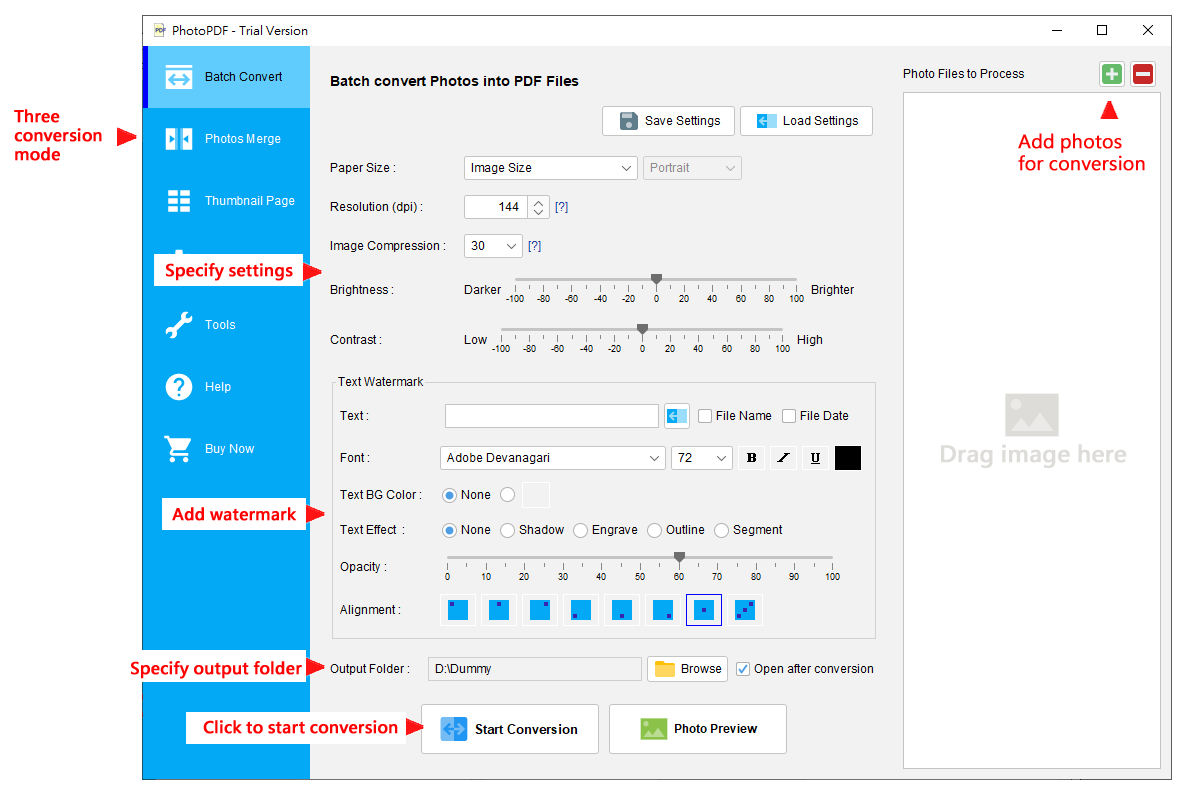
  1. Add photos to process

  2. On right hand side, add photo files to the process list.
  3. Specify settings of output PDF

  4. Set Paper Size, Orientation, Resolution, & Compression.
    Add watermark on output PDF.
    Specify output location
  5. Click Button to start the conversion

PhotoPDF Screenshot with description
Software Summary
Software Name
PhotoPDF Photo to PDF Converter 6.8.0
Release Date
2026-01-13 (First version released in 2006)
Interface Language
English, French, German, Chinese (Traditional/Simplified)
Platform
PhotoPDF is compatible with
- Windows 11, 10, 8.1, 8, 7
- MacOS 10.12 or later
Installation
Download Free Trial
Fully Functional. Access all features.

Windows Platform
The downloaded file is named photopdf-setup.exe (46.9MB).
Once download is complete, double click setup.exe to install. Pay attention to the folder where your browser saves setup.exe file.

MacOS Platform
The downloaded file is named photopdf-installer.pkg (63.3MB).
Once download is complete, double click on photopdf-installer.pkg to install. After installation, the software can be found in Launchpad.

* Installing or using the software will not modify system settings of your computer.
* No personal information is collected by the software.
Price
US$24.95

Buy Now
No monthly fee. Lifetime license.

30 Days Money Back Guarantee for PayPal or Stripe Payment
For inquiries, please contact us
Customer Hotlines :
+852 3107-0832
WhatsApp :
+852 5237-1808
PhotoPDF Software Related Links