Evinco Software: Streamline your business
English ▾
English
繁體中文
简体中文
☰
Home
About Evinco
Software
ChequeSystem
Cheque Printing Software
EasyBilling
Invoicing Software
Quick Receipt
: Thermal Printer Software
Robo
Mail
Mass Mail Software
Small Biz Software Bundle: EasyBilling+RoboMail
Privacy Scrubber
Software
Photo
PDF
Photo to PDF Converter
Photo
X
Batch Watermark Software
Smart
Calendar Software
News
Knowledge Sharing
Support & Contact
PhotoPDF Links
⋮
Home
Buy Now
FAQ
How-to
User Guide
Release History
Photo
PDF
Photo to PDF Converter
v6.8.1 • Available for Windows & Mac
Download Free Trial
Fully Functional. Access all features.
How to change the default folder?
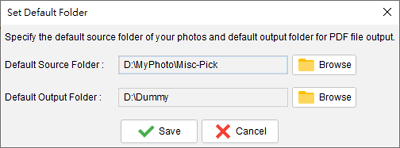
In menu "Settings", choose "Default Folder".
A dialog is shown as follows.
You can specify the source and output folder by clicking the browser button.
Click the "Save" button when ready.
How-to Articles
How to perform Batch Convert?
With movie demo!
How to perform Photo Merge?
How to generate Thumbnail Page?
How to set the properties of output PDF?
Can I change the paper size?
How to change the default folder?
 Evinco Software: Streamline your business