Evinco Software: Streamline your business
English ▾
English
繁體中文
简体中文
☰
Home
About Evinco
Software
ChequeSystem
Cheque Printing Software
EasyBilling
Invoicing Software
Quick Receipt
: Thermal Printer Software
Robo
Mail
Mass Mail Software
Small Biz Software Bundle: EasyBilling+RoboMail
Privacy Scrubber
Software
Photo
PDF
Photo to PDF Converter
Photo
X
Batch Watermark Software
Smart
Calendar Software
News
Knowledge Sharing
Support & Contact
PhotoPDF Links
⋮
Home
Buy Now
FAQ
How-to
User Guide
Release History
Photo
PDF
Photo to PDF Converter
v6.8.1 • Available for Windows & Mac
Download Free Trial
Fully Functional. Access all features.
Can I change the paper size?
You can define your own paper size.
In menu "Settings", choose "Paper Size".
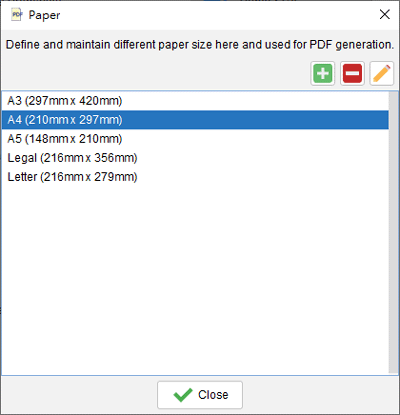
"Paper Size List" is shown as follows.
You can click the
to add a new Paper Size.
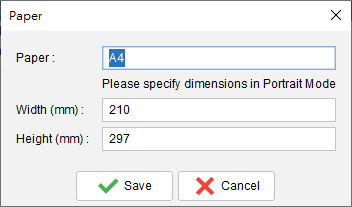
The "Paper Size" window is shown.
You need to provide the name and the size of your paper.
The created paper size will be available in the main window for the PDF output.
How-to Articles
How to perform Batch Convert?
With movie demo!
How to perform Photo Merge?
How to generate Thumbnail Page?
How to set the properties of output PDF?
Can I change the paper size?
How to change the default folder?
 Evinco Software: Streamline your business
 to add a new Paper Size.