Evinco Logo Evinco Software: Streamline your business
Evinco Logo
PhotoPDF Photo to PDF Converter
PhotoPDF
Photo to PDF Converter
Batch Convert Photos into Professional PDF Documents
Download Free Trial
Fully Functional. Access all features.
PhotoPDF User Guide
[Download PDF Version]
Thumbnail Page

create pdf thumbnail page from photos

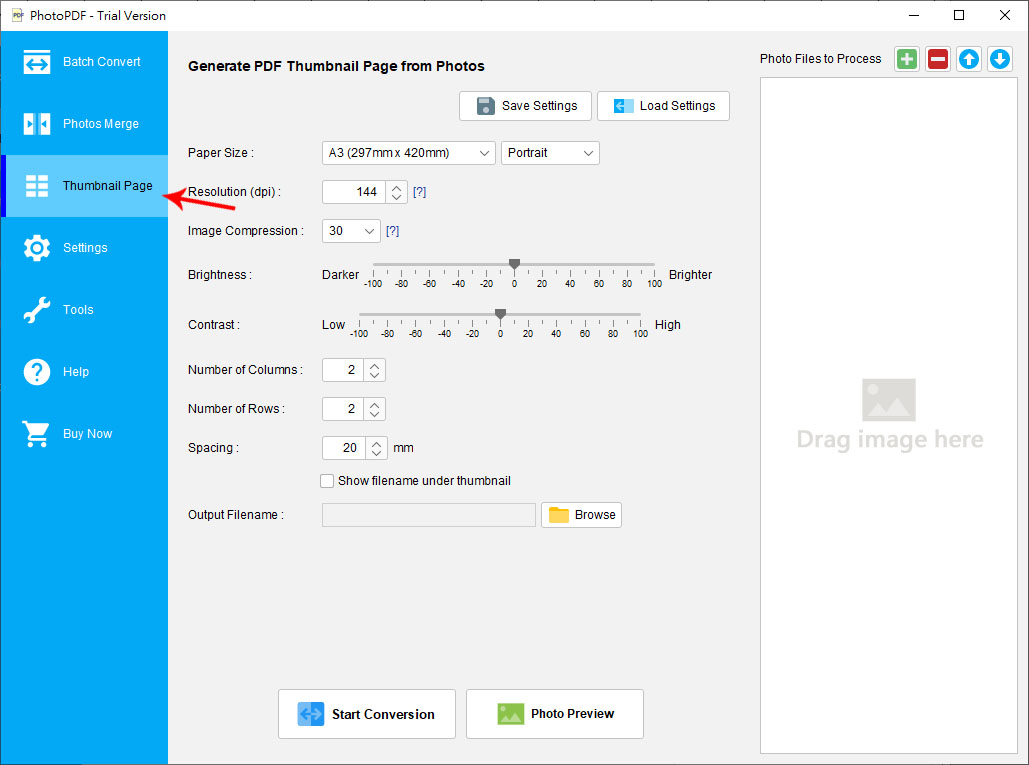
"Thumbnail" allows you generate Thumbnail PDF file with multiple photos.

You can adjust the following output settings:

  • Paper size: "Image Size" or other paper size like A4, A5, etc.
  • Orientation: Portrait or Landscape. Not available when paper size is set as "Image Size".
  • Resolution: The value given is in dot-per-inch (dpi).
  • Image Compression: The larger the compression, the smaller the output file size but with poor quality.
  • Brightness &s; Contrast: Adjust the photo brightness and constrast in the output PDF.
  • Number of Rows and Columns: Number of rows and columns of thumbnail in a page.
  • Spacing: Space between thumbnails.
  • Output file: Click the "Browse" button to specify a filename as the output pdf file.
When your photo list and settings are ready, you can click conversion button button at the bottom to start the conversion process.