Database

Quick Receipt efficiently stores your company’s documents, reports, and settings in a dedicated database folder. You have the flexibility to create multiple databases, with each one serving a different company. By default, Quick Receipt starts with a database named “Default.”
To manage these databases, navigate to the menu “File > Switch Database“.
- To add a new database, simply click the [+] button.
- To switch to a different one, highlight the desired database and click the [Switch Database] button at the bottom.
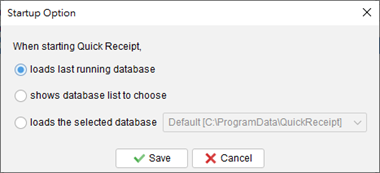
- When you launch the software, it will automatically load the last database you were using. You can change this startup behavior by clicking the [Settings] button in the top-right corner.