Evinco Logo Evinco Software: Streamline your business
Evinco Logo
 
Quick Receipt:
Thermal Printer Software
v2.9.5 • Available for Windows & Mac
Download Free Trial
Fully Functional. Access all features.
Print

Install Quick Receipt in Windows

  1. Download Quick Receipt trial version from
    https://www.evinco-software.com/eng/getfile.php?product=QuickReceipt
  2. Double click the downloaded quickreceipt-setup.exe file to start installation. Follow the on-screen instruction to install the software.
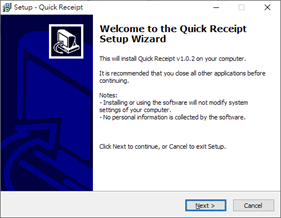
    1. Installation Welcome Screen
      Install Quick Receipt on Windows - Welcome Screen
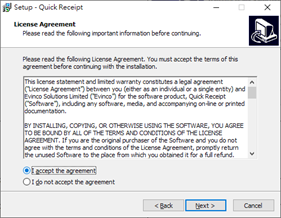
    2. Accept the license agreement.
      Install Quick Receipt on Windows - License Agreement
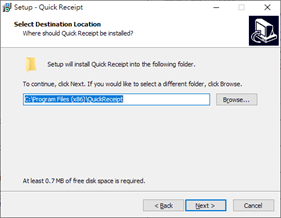
    3. Select the destination location.
      Install Quick Receipt on Windows - Install location
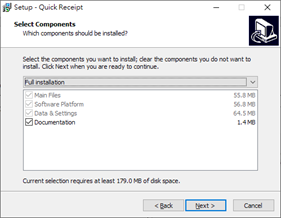
    4. Select the components to install.
      Install Quick Receipt on Windows - Install components
    5. Specify installation for all user or current user, and create Desktop Icon.
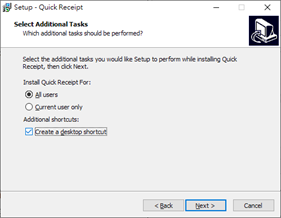
      Install Quick Receipt on Windows - Install for all users
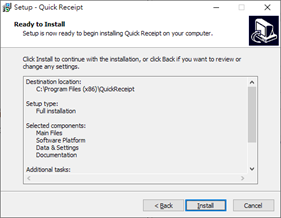
    6. Start the installation.
      Install Quick Receipt on Windows - Start installation
    7. Installation Finish. You may start Quick Receipt then.
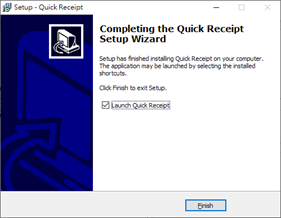
      Install Quick Receipt on Windows - Finish