
Print
How to print a receipt?
- In Receipt window, click [Print] icon at the top.
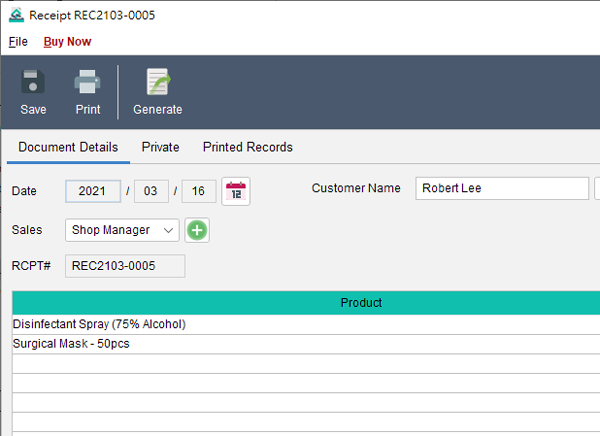
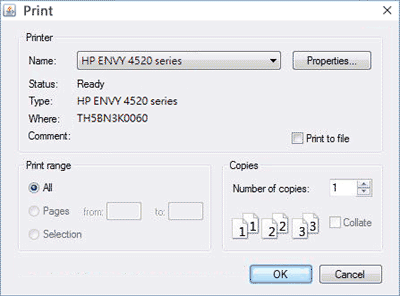
- Windows Print Dialog will be loaded. You can select your printer and specify the print settings.
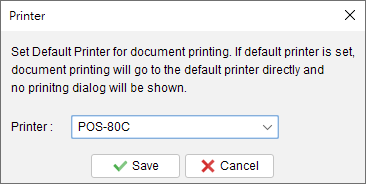
- If a default thermal printer is set, the receipt will be printed directly to the default printer and print dialog will not be shown. Default printer can be set in the main menu “Settings > Printer“.


Updated
-
Getting Started
-
Document
-
Document Settings
-
Customer List
-
Item List
-
Report
-
Settings
-
Tools
-
Database
-
How To
- How to Adjust Receipt Margins for Optimal Printing
- How to manage two companies in one Quick Receipt?
- How to export document data to Excel for further analysis?
- How to adjust column width of the line item in document?
- Add a QR Code to Receipt
- Where to set the default tax rate?
- How can I change the tax field? I need a VAT field.
- Where to set date format?
- How to Organize Document with Color Highlighting feature?
- Customize Columns Displayed in Document List
- Connecting Cash Drawer to Your Thermal Receipt Printer
- Create Windows Desktop Shortcuts for Databases
- Update Document Status
-
Troubleshooting