
Print
How to Add “Amount in Words” Field to Invoices
First you need to enable the “Amount in Words” field in the Preferences. Once the field is enabled, it will be shown in the document.
Enabling the “Amount in Words” Field
- Go to the menu “Customize Document > Preferences“
- In the Preferences window, switch to the “Amount in Words” tab.
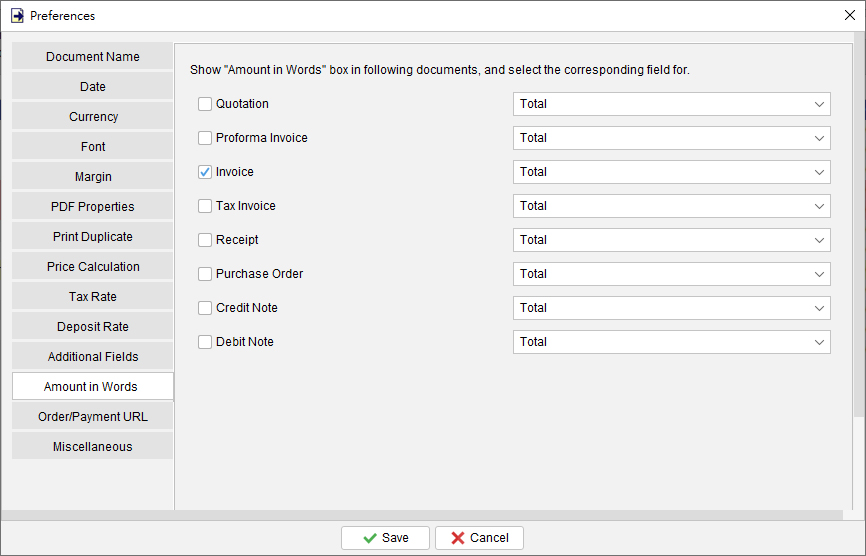
- Choose the documents for which you want to display the “Amount in Words” field.
- Click the [Save] button to apply the settings.

Show the Field in Your Invoice
- Open an invoice and go to “Line Item” tab.
- You will find the “Amount in Words” field below the line item table.
- Check the box to enable the field, and the amount will be automatically displayed in words.
Prefer to Watch? See the Full Tutorial Below
This video covers all the details mentioned in the article, giving you a complete visual walkthrough from start to finish.
Video Tutorial: Add 'Amount in Words' fieldUpdated
-
Getting Started
-
Document
- Document List
- Create New Document
- Batch Create Document
- Quotation
- Proforma Invoice
- Invoice
- Tax Invoice
- Receipt
- Purchase Order
- Delivery Note
- Packing Slip
- Ordering
- Packing List
- Weight List
- Credit Note
- Debit Note
- Recycle Bin
- Generate from Other Document
- Show Remaining Articles ( 3 ) Collapse Articles
-
Customize Document
- Customize Document
- Header
- Numbering
- Document Label
- Columns
- Columns Order
- Custom Field
- Document Color
- Company Chop & Signature
- Footer
- Default Document Options
- Paper Size / Layout
- Preferences
- PDF Properties
- Print Duplicate
- Price Calculation
- Tax Rate
- Payment Integration
- Email Messaging
- Show Remaining Articles ( 4 ) Collapse Articles
-
Template
-
Customer List
-
Supplier List
-
Item List
-
Report
- Report List
- Global Sales Report
- Monthly Sales Report
- Sales Report by Customer
- Global Payment Report
- Monthly Payment Report
- Payment report by Customer
- Monthly Statement
- Payment Received Report
- Customer Purchase History
- Item Sales Report
- Sales Person Report
- Total Tax Payable Report
- Supplier Report
- Monthly Statement for Supplier
- Raw Data Export
- Show Remaining Articles ( 1 ) Collapse Articles
-
Settings
-
Tools
-
Workspace
-
How To (Customize Document)
- Customizing Date Format
- Change the font or style in header?
- Use my own font in the document?
- How to add discount column in Invoice?
- How to Add "Amount in Words" Field to Invoices
- Input multi lines in line item?
- Where to set the default tax rate and deposit rate?
- Adjust Watermark Settings
- Rename Documents
- Customize Item Columns in Your Documents
- How to Adjust Decimal Places in Documents
-
How To
- Organize Document with Color Highlighting
- Show or Hide Columns of Document List
- Use variables to load document content dynamically
- How to Create Documents from Existing Documents
- How to Copy Item Information between Documents
- How to record a payment received?
- Export Document into PDF, HTML or XLS format
- Create Windows Desktop Shortcuts for Workspaces
- Steps to Modify Currency Symbols in Document
- How to Update Document Status
- How can I add product photos into Invoice?
- Apply Text Formatting to Line Item Descriptions
- How to Adjust the Font Size for Documents
-
Troubleshooting